

Introduction
Tibia is one of the oldest MMORPGs still online and under active development. Created in 1997 by students of a German university — who later founded CipSoft, it eventually became very popular, especially in Brazil.
Some time ago, I ended up stumbling upon a copy of the Alpha client (version 1.03), which, as far as I know, was the first publicly released version. You can download it here.
Unfortunately, however, there is no server (official or emulator) available for this version of the game. The client was written in C++ (compiled with Borland C++ 4.5 for 16-bit Windows systems, specifically Windows 3.1 and 95, but it is possible to run it even on Windows 2000).
Since I enjoy retro stuff and programming puzzles, I decided to explore the client to understand how it works and, who knows, maybe write a server emulator one day.
Since I had to start somewhere, I chose to understand how sprites are stored and read in this version. Throughout this post, I aim to share some of my understanding gained through reverse engineering.
To do this, I used a few tools, in particular:
- A Virtual Machine running Windows 2000
- IDA Freeware Version 5.0
- Python (to write test scripts)
Unfortunately, because the executable is compiled for 16-bit systems (NE), we have to deal with far and near pointers. More modern tools like Ghidra (or even newer versions of IDA) lack complete support or simply do not support it at all.
MUDOBJ.SPR
This is the file that contains the game’s sprites. Its structure is as follows:
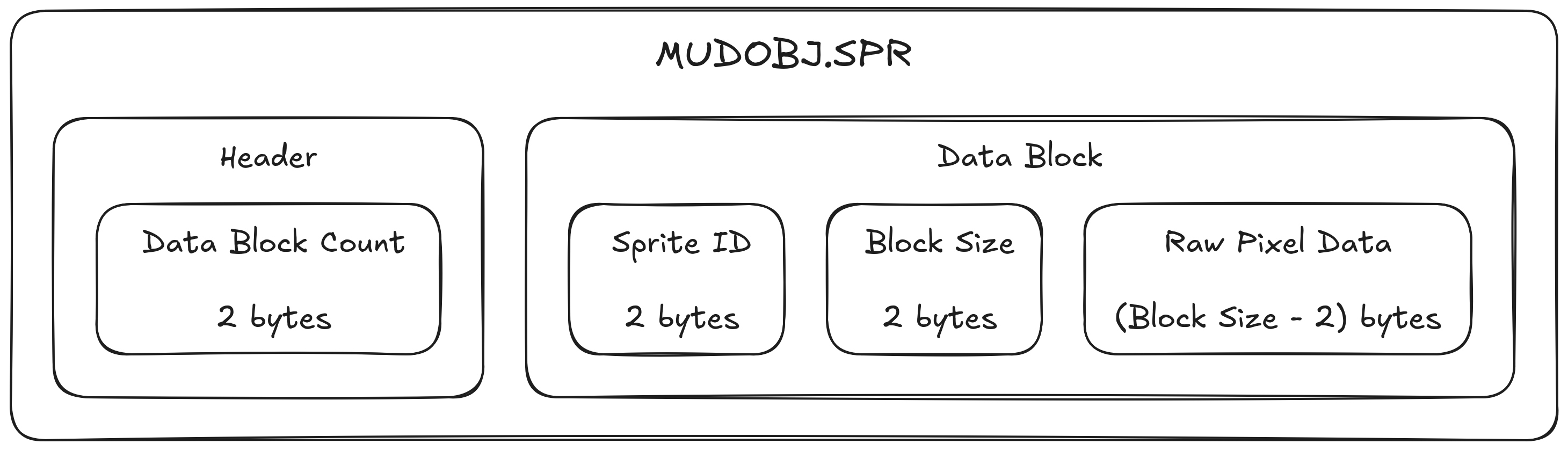
Header
- Data Block Count (2 bytes): defines the total amount of data blocks that follow.
Data Block
- Sprite ID (2 bytes): unique identifier of the sprite.
- Block Size (2 bytes): total size of the sprite’s data in bytes. It includes the two bytes of the size field itself, but does not include the Sprite ID’s size.
- Raw Pixel Data (Block Size - 2 bytes): the payload containing the pixel data in a compressed format.
Pixel Compression
For compression, a customized version of Run-Length Encoding is used. The decompression logic interprets the byte stream as alternating sequences of Transparent and Colored blocks until the entire sprite is processed.
The decompression logic follows this pattern:
- Transparent Block:
- Read: 2 bytes.
- Calculate:
transparentBytes = value % 0x5A0pixelsToSkip = transparentBytes / 3
- Action:
- Advance the current position by
pixelsToSkip. These pixels remain transparent (alpha = 0).
- Advance the current position by
- Colored Block:
- Read: 2 bytes (representing the number of bytes of colored pixels).
- Calculate:
coloredPixels = value / 3
- Action:
- Iterate
coloredPixelstimes. - For each iteration, read 3 bytes.
- Pixel Format: BGR (Blue, Green, Red), 1 byte per channel.
- Write the opaque pixel (alpha = 255) at the current position. Note: sprite data is stored from left to right, bottom to top (starts at the bottom-left, ends at the top-right).
- Iterate
Sprite Extraction Script
To run the extraction script below, you will need Python installed and the Pillow library for image manipulation.
Install the Pillow library:
pip install PillowRun the script: Make sure the
MUDOBJ.SPRfile is in the same directory as the script (or pass the file path as an argument) and run:python extract_sprites.py(If you want to pass a specific file, run
python extract_sprites.py path/to/file.SPR).
The extracted sprites will be automatically saved in a folder named output/ in the same directory.
Below is the complete code for the script:
import struct
import os
import sys
from PIL import Image


def extract_sprites(filename, output_dir="output"):
    # 1. Create the output folder if it doesn't exist yet
    if not os.path.exists(output_dir):
        os.makedirs(output_dir)
        print(f"Directory created: {output_dir}")

    try:
        with open(filename, "rb") as f:
            print(f"Processing {filename}...")

            # 2. Read the sprite count (uint16)
            header_data = f.read(2)
            if len(header_data) < 2:
                print("Error: File too small.")
                return

            sprite_count = struct.unpack("<H", header_data)[0]
            print(f"{sprite_count} sprites found. Extracting...")

            sprites_extracted = 0

            # 3. Iterate through all sprites
            for _ in range(sprite_count):
                # Read ID (uint16) and Size (uint16)
                header = f.read(4)
                if len(header) < 4:
                    break

                sprite_id, sprite_size = struct.unpack("<HH", header)

                # The 'size' field includes the 2 bytes of the size field itself,
                # so the actual payload data size is size - 2.
                payload_size = sprite_size - 2

                if payload_size <= 0:
                    # Empty or invalid sprite - should be skipped.
                    continue

                # Read the complete RLE payload for the sprite.
                sprite_data = f.read(payload_size)
                if len(sprite_data) != payload_size:
                    print(f"Warning: Unexpected end of file for sprite {sprite_id}")
                    break

                # 4. Decompress RLE data
                # Create a transparent 32x32 image
                img = Image.new("RGBA", (32, 32), (0, 0, 0, 0))
                pixels = img.load()

                read_offset = 0
                current_pixel = 0

                while read_offset < payload_size and current_pixel < 1024:
                    # A. Transparent Block
                    # We need at least 2 bytes for the transparent pixel count
                    if read_offset + 2 > payload_size:
                        break

                    trans_raw = struct.unpack_from("<H", sprite_data, read_offset)[0]
                    read_offset += 2

                    # Apply modulo logic
                    trans_val = trans_raw % 0x5A0

                    # Convert byte count to pixels
                    skip_pixels = trans_val // 3
                    current_pixel += skip_pixels

                    # B. Colored Block
                    # We need at least 2 bytes for the colored pixel count
                    if read_offset + 2 > payload_size:
                        break

                    colored_bytes = struct.unpack_from("<H", sprite_data, read_offset)[0]
                    read_offset += 2

                    # Read colored pixel bytes (BGR sequence)
                    if read_offset + colored_bytes > payload_size:
                        break

                    # Extract the colored pixel block
                    color_chunk = sprite_data[read_offset: read_offset + colored_bytes]
                    read_offset += colored_bytes

                    # Process the block in groups of 3 bytes (BGR)
                    for i in range(0, len(color_chunk), 3):
                        # Ensure we have the complete trio
                        if i + 2 < len(color_chunk):
                            b = color_chunk[i]
                            g = color_chunk[i + 1]
                            r = color_chunk[i + 2]

                            if current_pixel < 1024:
                                # Calculate X, Y
                                x = current_pixel % 32
                                y = current_pixel // 32

                                # Flip Y axis
                                flipped_y = 31 - y

                                # Write the pixel
                                pixels[x, flipped_y] = (r, g, b, 255)
                                current_pixel += 1

                # 5. Save the sprite.
                output_path = os.path.join(output_dir, f"{sprite_id}.png")
                img.save(output_path)
                sprites_extracted += 1

            print(f"Done! {sprites_extracted} extracted to '{output_dir}/'.")

    except FileNotFoundError:
        print(f"Error: could not find file '{filename}'")
    except Exception as e:
        print(f"An unexpected error occurred: {e}")


if __name__ == "__main__":
    # If necessary, change the filename here, or pass as an argument
    file_to_process = "MUDOBJ.SPR"
    if len(sys.argv) > 1:
        file_to_process = sys.argv[1]

    extract_sprites(file_to_process)